Sample ActiveX Control Page
You will most likely not be able to view the sample because you are not running Internet Explorer
Development Samples
I have been developing applications on computers for the majority of my life. I have written code both professionally as well as a hobby. The links below take you to some samples of my development skills. Some have practical applications, while others are more whimsical.
As a trainer, I am required to stay current with the latest and greatest, I have samples below that highlight technologies like ActiveX, DHTML, Active Server Pages, ADO, etc.
The samples on this page have a heavy Microsoft Internet Explorer bias. There are few if any examples on this page that can be accessed with Netscape. Since you aren't running Microsoft IE you will not be able to view all of the samples on this page. To get the full effect, you should be using Microsoft Internet Explorer 4.01 SP1 or greater.
| ActiveX And DHTML Samples |
|---|
Custom Controls (View It!)
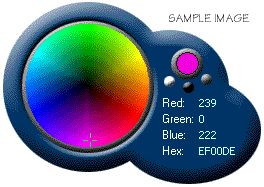
Following is a sample of an ActiveX control being used within a web page. As the control is an ActiveX control, it will only work in Internet Explorer or Netscape with the NCompass plug-in. This control is here for example purposes only. If you cannot view the control's sample page, you can at least see what the control looks like from the image below. The control is not signed, so you may need to change the security settings on your browser to be able to download it, and run it.
Micorosoft Agent (View It!)
This information is just in here for fun. The Microsoft Agent is a fun way to enhance your applications, or web site's interface. Agents can talk to, and listen to, your users. Custom agents can be developed and extra functionality can be added. Before running the agent sample page, you need to donwload and install some components from Microsoft..| MS Agent Core File Downloads |
 Sample Animation |
|
| MS Agent Core Components (392k) | You must download and install this file. It contains the core MSAgent components, and it is required to see the demo. | |
| Lernout & Hauspie Text-To-Speech Engine (998k) | This is the text-to-speech engine. It lets the agents talk! If you want to hear them talk, you will need this. | |
| My Agent (23k) | This is the character that I use in my sample. You need it to see the sample. Download this file to the \WINNT\MSAGENT\CHARS (for Windows NT) or \WINDOWS\MSAGENT\CHARS (for Windows 9x) folder. | |
See The Sample Page
You will most likely not be able to view the sample because you are not running Internet Explorer
| ADO Samples |
|---|
Flash Cards Database (View It!)
This sample uses the same flash card database as the MSAgent sample above, just withouth the extra MSAgent code mixed in. The flash card database contains flash cards and answers that I used when studying for various certification tests.
Bret's ASP/ADO Tutorial (View It!)
This is a tutorial that I created for developers working with me on projects in for my consulting company Net Connex. While it is a tutorial, it is also a live, working site that you can interact with as you learn. As a last benefit, this page includes the ability to view its source code. If you would like to view my code, you can do so.
| XML Samples |
|---|
| The XML Samples were developed with Microsoft Internet Explorer 5.0 or greater in mind. Since you are not running IE 5.0 or greater you may have difficulty viewing the examples below. If you are prompted to download the documents, you may do so, and view them in a text editor locally. |
ASP Generated XML (View It!)
This is a sample ASP page that queries data from an Access database, and delivers it in an XML format. This might be viewed best with Internet Explorer 5.0, but any valid XML client should be able to browse the link above.
Flashcard XSL sample (View It!)
This is an XSL style sheet for the XML document generated above. Since XSL documents are really XML documents, you can view the XSL style sheet directly in Internet Explorer. Give it a try!
XML & XSL Sample (View It!)
Taking the ASP generated XML document from above, and marrying it with the XSL style sheet above gives us a nicely formatted XML document that is easy to view in your web browser.
XML Data Island Sample (View It!)
XML Data Islands allow developers to "embed" XML data into their HTML documents. The embeded XML is called a "Data Island". These HTML documents, when displayed on the client can then pull data from the XML data island and integrate it with what the user sees.